See what course materials cost students, and what the library already provides
WyderNet takes the prices from your bookstore's adoption list and checks each title against your holdings. You see each course's cost to students, what the library already covers, and where an open alternative might work.
fill
One product. This is one step in the same workflow.
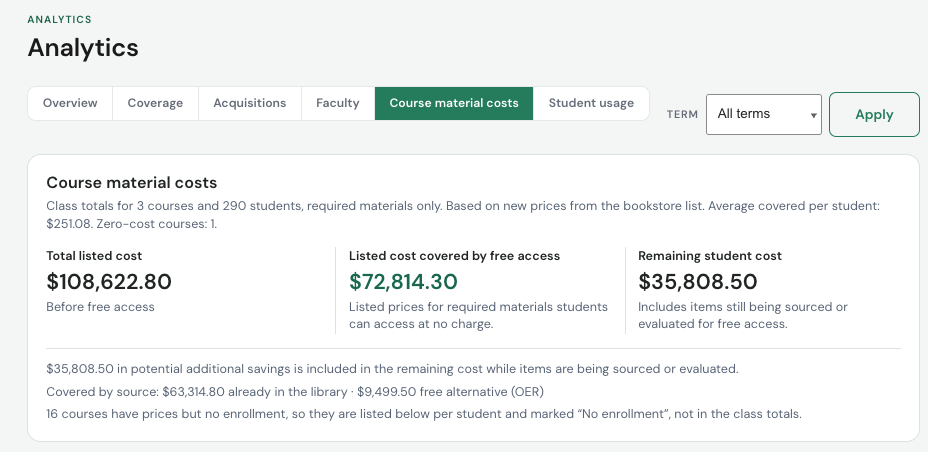
Sample data: course material costs
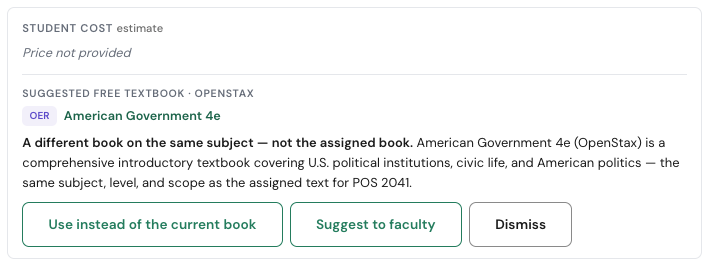
Sample data: a suggested free textbook
What it does
- Shows each course's cost to students, from the bookstore's listed prices.
- Shows which of those titles the library already provides.
- Lists access codes separately, with their price, since the library can't provide them.
- Sorts titles by cost to students, so you can start with the most expensive.
- Searches open sources, including OpenStax, for possible alternatives.
- Lets you suggest an alternative to the instructor. The instructor decides.
- Publishes one page for students listing the textbooks the library provides.
Good to know
- Prices: from your bookstore's adoption list.
- Open alternatives: not every title has one. WyderNet shows what it finds.
- Faculty choice: alternatives are suggestions. Faculty decide what they assign.