Does your collection support what faculty assign?
Most libraries can’t answer that course by course. Course lists arrive late, checking them is manual, and students often don’t know what the library already provides.
WyderNet checks every assigned reading against your holdings, finds the right edition or an open alternative, helps you fill the gaps, and gives students one link per course.
Late course lists, manual checks, every term
Hours of title-by-title checking every term
Staff check each assigned title against the catalog by hand, usually just before the term starts, and repeat the work every semester.
Students start the term without their materials
If assigned materials aren’t checked against the collection before the term, students buy what the library already provides, or go without and fall behind.
Budget decisions without course data
When budgets are tight, every purchase has to count. Without a course-by-course view, it’s hard to see which titles courses depend on before you buy, cancel or weed.
Every course library-ready before the term starts
WyderNet reads every course’s assigned materials, from syllabi, bookstore lists or the LMS, and checks each one against your collection.
Saves staff hours every term
WyderNet checks each assigned reading against your holdings, including edition and format. Staff confirm uncertain matches and decide what to buy or which alternative to use.
Students can get every reading from one link
One list per course, with a direct link to each reading: the ebook, the catalog record, the copy on reserve, or an open alternative. Missing titles go through your existing acquisitions workflow.
Spend where courses actually need it
See how well the collection supports each department, so a tight budget goes where courses need it.
See how a course becomes library-ready
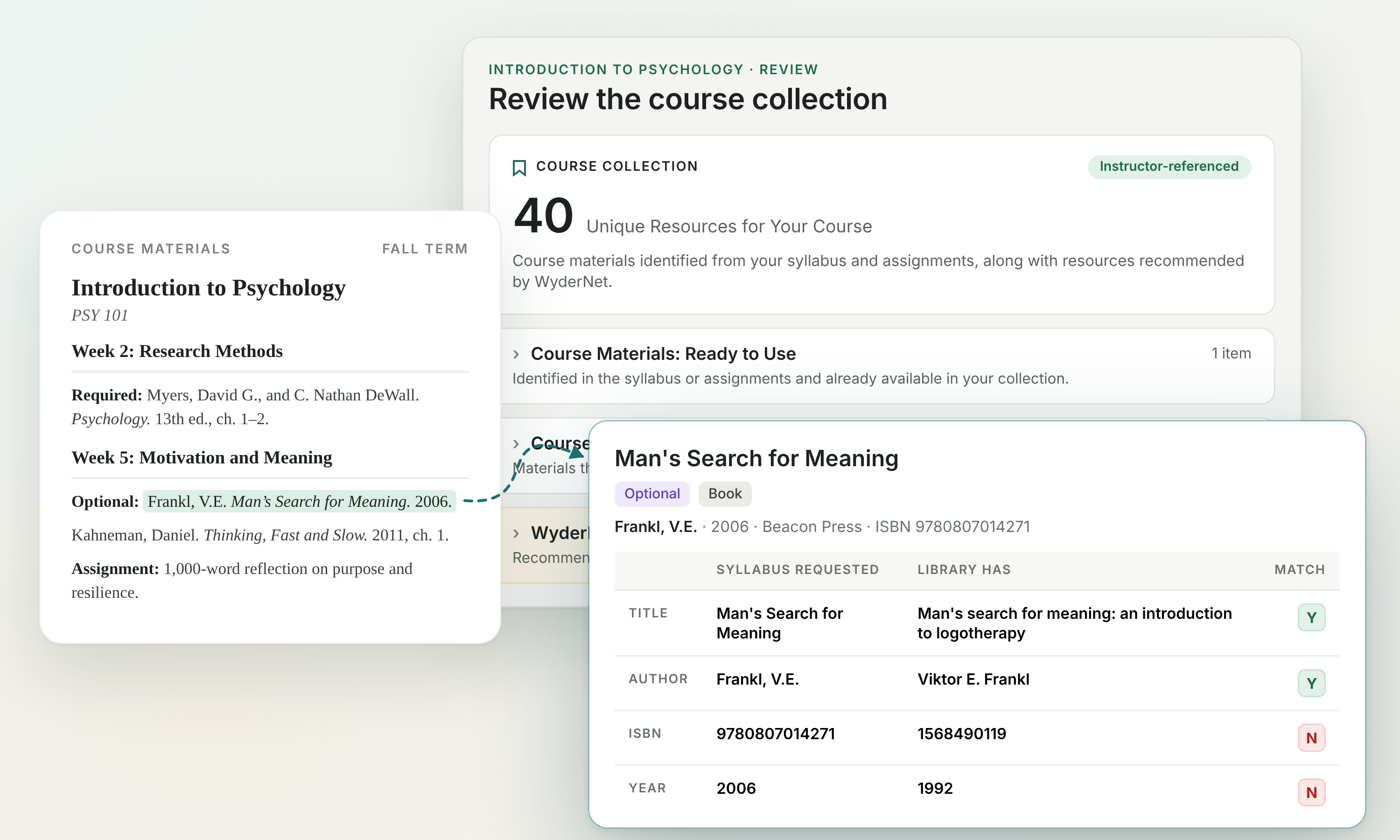
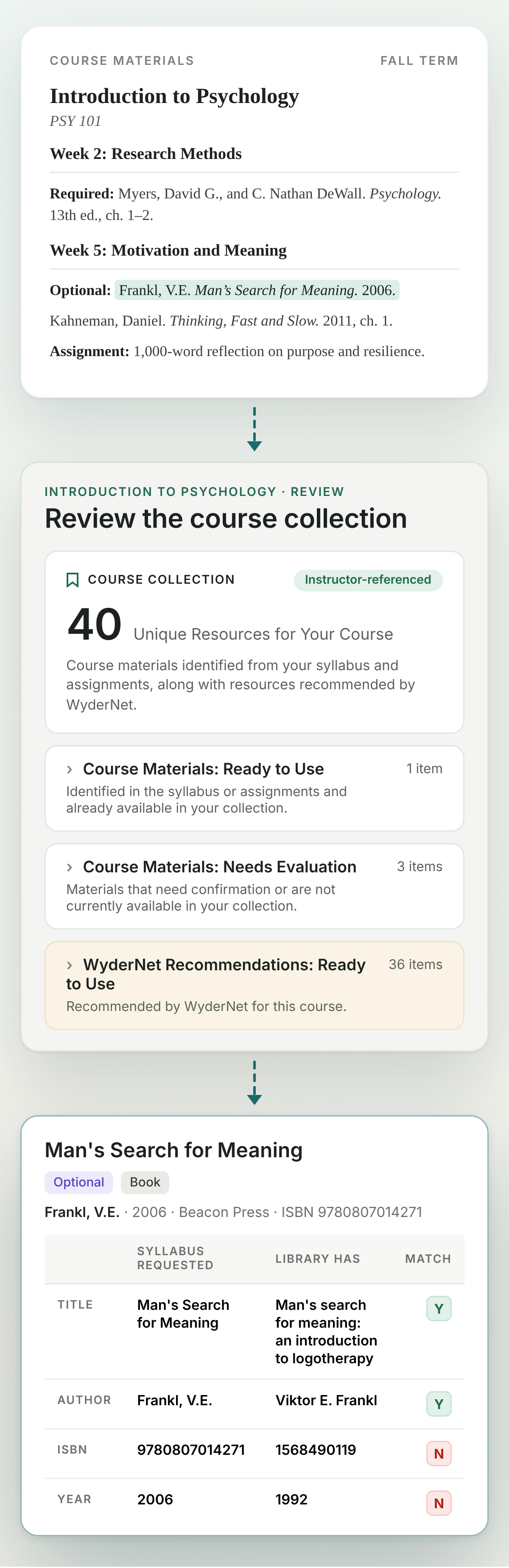
WyderNet identifies the materials assigned in a course, checks each one against your collection, and shows which are available to students.
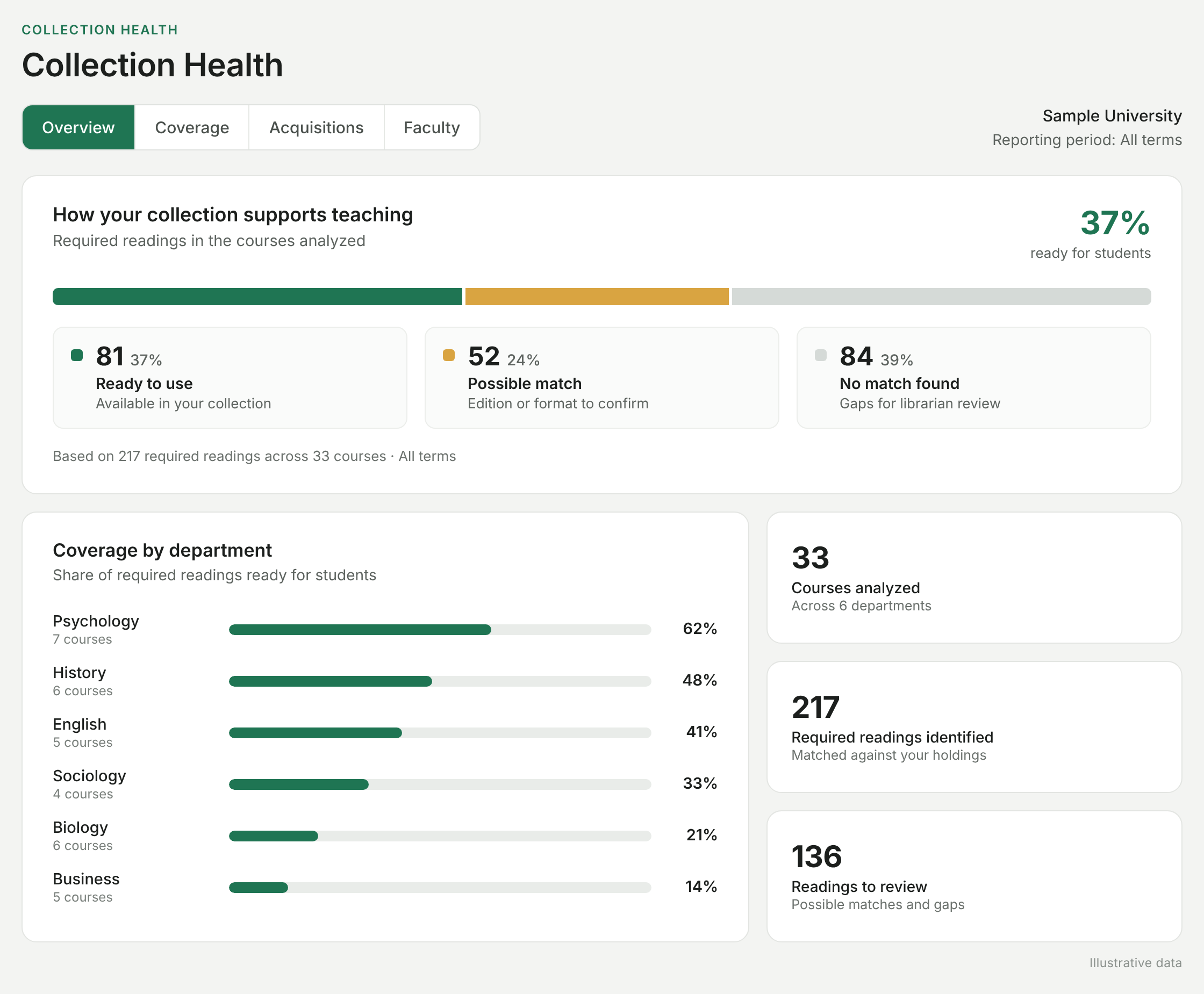
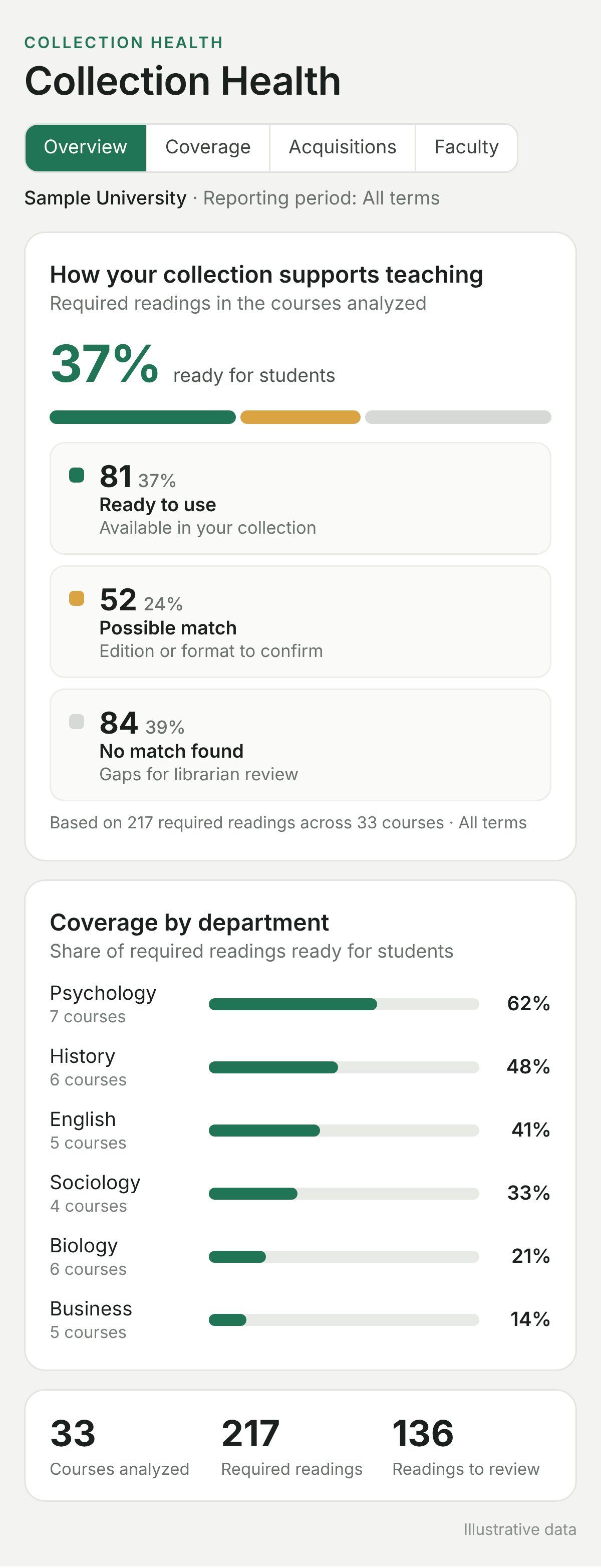
Show how the collection supports teaching and learning
See, department by department, how well the collection supports the curriculum, and where to focus collection development.
From what’s assigned to library-ready
Start with what you already have. WyderNet checks it against your collection, and your librarians decide what to publish.
Reads the course materials
Start with what's already available: bookstore adoption feeds, syllabi shared directly by faculty, or course materials from your LMS. WyderNet lists every assigned title.
Checks your collection
Each reading is marked available, possible match, or not found yet, with edition and format checked.
Librarians decide and publish
Staff confirm possible matches, decide how to fill missing titles (purchase, OER or interlibrary loan), and publish one list per course for students. A course is library-ready when every reading has a clear path to students.
Easy to get started
✓ Use the course materials you already have
✓ No new faculty workflow. Faculty can share a syllabus and mark what should go on reserve, if they want to.
✓ Start with the courses or departments you choose
Faculty
Nothing new to learn. If faculty share a syllabus, it's checked too, and students get one page with their assigned readings.
WyderNet
Finds every assigned reading, checks it against your collection, and shows what’s missing and where there’s an open alternative.
Your librarians
Review uncertain matches and gaps, add recommendations, and decide what to make available to students.
Works with the systems you already use
WyderNet uses a read-only connection to your holdings. Nothing in your systems is changed. WyderNet checks holdings through your discovery service, fits your existing ILL and acquisitions workflows, and works alongside your reading list system and LMS.
What WyderNet does, course by course
See how assigned materials align with your collection, what students can access, and where other resources could help, with librarians in control.
Check every assigned reading
Match titles, editions, and formats to what your library holds or licenses.
Check edition and format
See when the library holds a newer edition or an ebook version, and decide which one students should use.
Evaluate how to fill the gaps
See where materials aren’t available or access is limited, then choose a path (ILL, OA/OER, another format or license, or purchase) in your existing workflows.
Share with instructors
Send the course collection to the instructor, who can link it from the syllabus or LMS. Faculty review is optional.
Publish a course collection
One page per course with every reading, a direct link to each, and librarian notes. Students can open the course collection without logging in. Library resources may require institutional sign-in.
Lower course material costs
See what assigned textbooks cost students, track savings when the library provides access or an OER alternative, and find resources that serve many courses.
In your collection. Nothing to do, or choose an alternative (for example, OER or an unlimited-user ebook).
A similar item is held. Confirm it’s in the catalog, or swap for another format (for example, an ebook instead of print).
Not in your collection. Pick an alternative (catalog or OER) or request a purchase.
Any item can be sent to the instructor for review. They reply from a link in the email.
Built by people who know library technology
A small team with decades in library technology, building WyderNet with design-partner libraries.

Tamir Borensztajn
Founder & Product Lead
Works with libraries to shape WyderNet, drawing on 20+ years in library technology, product, and strategy, including 11+ years at EBSCO.

Guy Shahaf
Chief Technology Officer
Builds WyderNet’s technology and leads the Library Information Systems team at Technion, drawing on 20+ years in enterprise software and cloud architecture.

Shay Gabay
Data, AI & Operations
Digs into complex questions, follows where the data leads, and evaluates our AI models to help shape WyderNet for libraries and students.
Built for the teams connecting collections to teaching
Collection development, acquisitions, electronic resources, course reserves, and instruction librarians.
How your library gets started
Start small, see the results on real courses, then decide.
1
See the workflow
Book a demo to see how WyderNet works.
2
Choose where to begin
Pick a department, program, or group of courses to start.
3
Prepare your first collections
We’ll connect WyderNet to your holdings and help your team review results and publish its first course collections.
4
Evaluate and expand
Review coverage, gaps, student access, staff time, and faculty feedback, then add courses when it makes sense.
Questions
Common questions
How is this different from our reading list or course reserves tool?
WyderNet works alongside your course reserves and reading list tools. It doesn't ask faculty to build lists. It starts from the syllabi and bookstore adoptions you already have, checks them against your collection, and shows what students can access and where gaps recur across courses.
Where do course materials come from?
Whatever you already have: bookstore adoption feeds, syllabi shared directly by faculty, or course materials from your LMS. LMS integration is priced separately.
What does it cost?
Pricing is based on the number of courses you support each year. Book a demo and we’ll walk you through it.
Book a demoCan WyderNet show cost savings for students?
Yes. WyderNet shows what assigned textbooks cost students, tracks the savings when the library provides access or an OER alternative, and shows which resources serve many courses.
Can WyderNet help confirm a course is truly no-cost or low-cost?
Yes. Confirming a course is no-cost usually means checking every assigned item, not just the textbook. WyderNet checks everything assigned, including chapters and articles, against your collection, and shows what students can already access and what’s left to source.
See what it takes to make your courses library-ready.
Book a demo to see how WyderNet connects course materials to library collections, shows what students can access, and builds a view of collection health across courses.
Book a demo
Tell us about your library and we’ll set up a demo.
Thank you.
We’ll be in touch shortly to schedule your WyderNet demo.